This guide explains how to install and configure Python on a mindzie studio server so that Data Designer Python scripts run locally. It takes about ten minutes and requires administrator access to the server.
Before installing Python
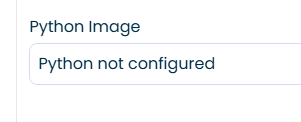
Before you install Python on the server, you will see the message below everywhere Python is used in mindzieStudio.
Install Python
- Download Python | Python.org
- Make sure to install 3.11 or later
- Run the installation “As Administrator”
- Installation selections
- Select both check boxes
- Click Customize Installation
- Click Next
- Make sure “Install Python 3.x for all users”
- Click Install
- Click “Disable path length limit”
- Check if version has been installed
- Open command line
- Run: “python –version”
- It should return something like: Python 3.13.5
- Open command line
- Restart the virtual machine
Install Python libraries
Make sure to pip install all the libraries you want to use in the Python scripts
Must install
These two libraries must be installed; all other components are optional and can be installed as needed.
- pip install numpy
- pip install pandas
After installing Python
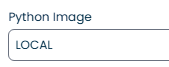
After installing Python correctly, you should see the LOCAL identifier where Python is used.
Next steps
With Python configured you can use Python transformations in mindzie Data Designer alongside the low code tools. If you run into problems, contact support@mindzie.com or read how to move projects between mindzie studio environments.