Data Designer: ETL and Data Transformation for Process Mining

Create your process event logs from any system, for any system

Every process mining project starts with an event log. Data Designer connects to the systems that run your business, transforms their records into clean event logs, and keeps those logs refreshed, without a separate ETL tool.

img Solution

ETL and data transformation, built for process mining

Process mining depends on one thing that most systems do not produce on their own: a clean event log with a case ID, an activity, and a timestamp for every step. Data Designer is the ETL and data transformation layer of the mindzie platform that produces it. Connect to ERP, CRM, service, finance, and HR systems, join and clean the records, define what counts as a case and an activity, and publish an event log that mindzie Studio can mine immediately.

Because the transformation lives inside the platform, there is no separate ETL tool to license, no handoff to a data engineering queue, and no gap between the log and the analysis. Analysts work in a low code visual interface, quality checks confirm the design before it runs, and Python scripting is there for the transformations that outgrow the canvas. Refresh on a schedule and every process map, dashboard, and monitor updates with it.

home screen 1 768x482

Amigo do utilizador

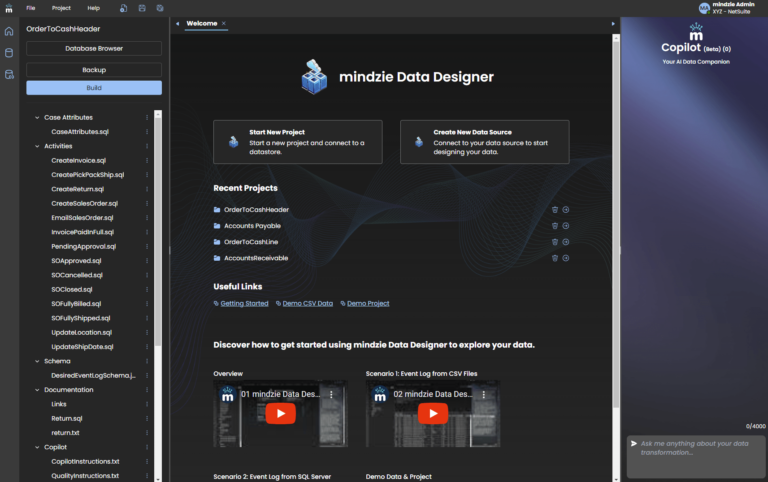
Easy to navigate UI, generate documentation, check quality, and more.

Copiloto de IA

Our AI Copilot is like having an expert beside you. Ask questions, have it join data, and so much more.

Model objects, not just cases

Define orders, items, shipments, and invoices as related objects, then generate the case perspective you need for each analysis. This is how mindzie supports object centric process mining.

From raw system tables to an event log in four steps

Data Designer takes you from source tables to a published event log inside the platform, with AI assistants to help at each step.

Connect

Use prebuilt connectors for SAP, Oracle, Dynamics 365, ServiceNow, NetSuite, Salesforce, and Snowflake, or connect to any database, data warehouse, or file export.

Transform

Join, filter, and clean the records with low code tools. Drop the fields the analysis does not need and standardize the ones it does.

Define

Choose the case ID, the activities, and the timestamps, or model several related objects and generate a perspective for each one.

Publish

Run the quality checks, generate the documentation, and publish the event log to mindzie Studio on a schedule you set.

Data sources

Connect to the data sources that run your processes

Data Designer ships with native connectors for the enterprise applications, databases, and cloud data warehouses your processes already run on. If a system has no native connector, load a CSV export or use any ODBC source, and move to a direct connection later without rebuilding your work.

See all supported connectors

Enterprise applications

SAP ECC and S/4HANA, SAP SuccessFactors, Oracle, NetSuite, Microsoft Dynamics 365, Salesforce, and ServiceNow, through native connectors, ODBC, or exports.

Databases

Microsoft SQL Server and Azure SQL, Oracle Database, PostgreSQL, MySQL and MariaDB, IBM DB2, SAP HANA, Sybase ASE, SQLite, Microsoft Access, and any ODBC compliant source.

Cloud data warehouses

Snowflake, Amazon Redshift, Teradata, and Vertica, connected directly so event logs refresh from the warehouse you already maintain.

Files and APIs

CSV exports from any system, XES event logs, a dataset API for automated uploads, and Python scripting for transformations that outgrow the visual canvas.

Características

Saiba por que razão os utilizadores novos e avançados estão a recorrer ao Data Designer do mindzie para gerar os seus registos de prospeção de processos e de tarefas.

Linguagem natural

Gain the insights you need from your data with a simple natural language interface.

Controlo de qualidade

Integrated quality check tools help confirm your designs are optimized.

Documentação de construção

Deixe de criar manualmente a sua documentação e deixe que o nosso designer de dados o faça por si.

Controlo de versões

Track to do lists, iterations, and more with integrated version tracking.

Conectores pré-construídos

Native connectors for SQL Server, Oracle, PostgreSQL, MySQL, Snowflake, SAP HANA, Redshift, and more, plus CSV, XES, and ODBC.

Cópias de segurança

Crie cópias de segurança sempre que necessário para manter o seu trabalho seguro e protegido.

Frequently asked questions

Do we need a separate ETL tool for process mining?

No. Data Designer is the ETL and data transformation layer of mindzie, so extraction, transformation, and event log publishing happen inside the platform. There is no separate ETL license to buy and no handoff to a data engineering queue between the source system and the analysis.

Native connectors cover Microsoft SQL Server, Oracle, PostgreSQL, MySQL, IBM DB2, SAP HANA, SAP SuccessFactors, Snowflake, Amazon Redshift, Teradata, Vertica, Sybase ASE, SQLite, Microsoft Access, and any ODBC compliant source. CSV exports and XES event logs can be loaded directly, and a dataset API supports automated uploads.

Not for most work. The visual interface and the built in AI assistants, including the DB Assistant, the ETL Assistant, and the AI Event Log Builder, help you explore tables, write transformations, and define the case ID, activities, and timestamps. SQL and Python are available when you want full control.

Yes. Export the tables you need as CSV files and load them into Data Designer, which imports them into a local database for transformation. If you name the files after the source tables, you can switch to a direct database connection later without rebuilding the event log design.

Connections use read only service accounts with the minimum permissions required, and all API calls, uploads, and database connections are encrypted with SSL and TLS. Organizations that cannot move data to the cloud can run mindzie on premises so the data never leaves their environment.